
100% Private on Your Device • Exact IRS Tax Rules • Every Dollar Accounted For

Plan Your Retirement Spending With Confidence. A Clear, Private Guide — Not a Black-Box Calculator.

Built for thoughtful planners ages 45–68+ — whether you're preparing your first nest egg or managing multi-millions. Map your spending, steer clear of surprise tax traps, and build lifelong confidence alongside your advisor.

Works offline on Mac & Windows · No analytics or tracking · No account needed to try it

Private Desktop Mode — No Data Leaves Your Machine
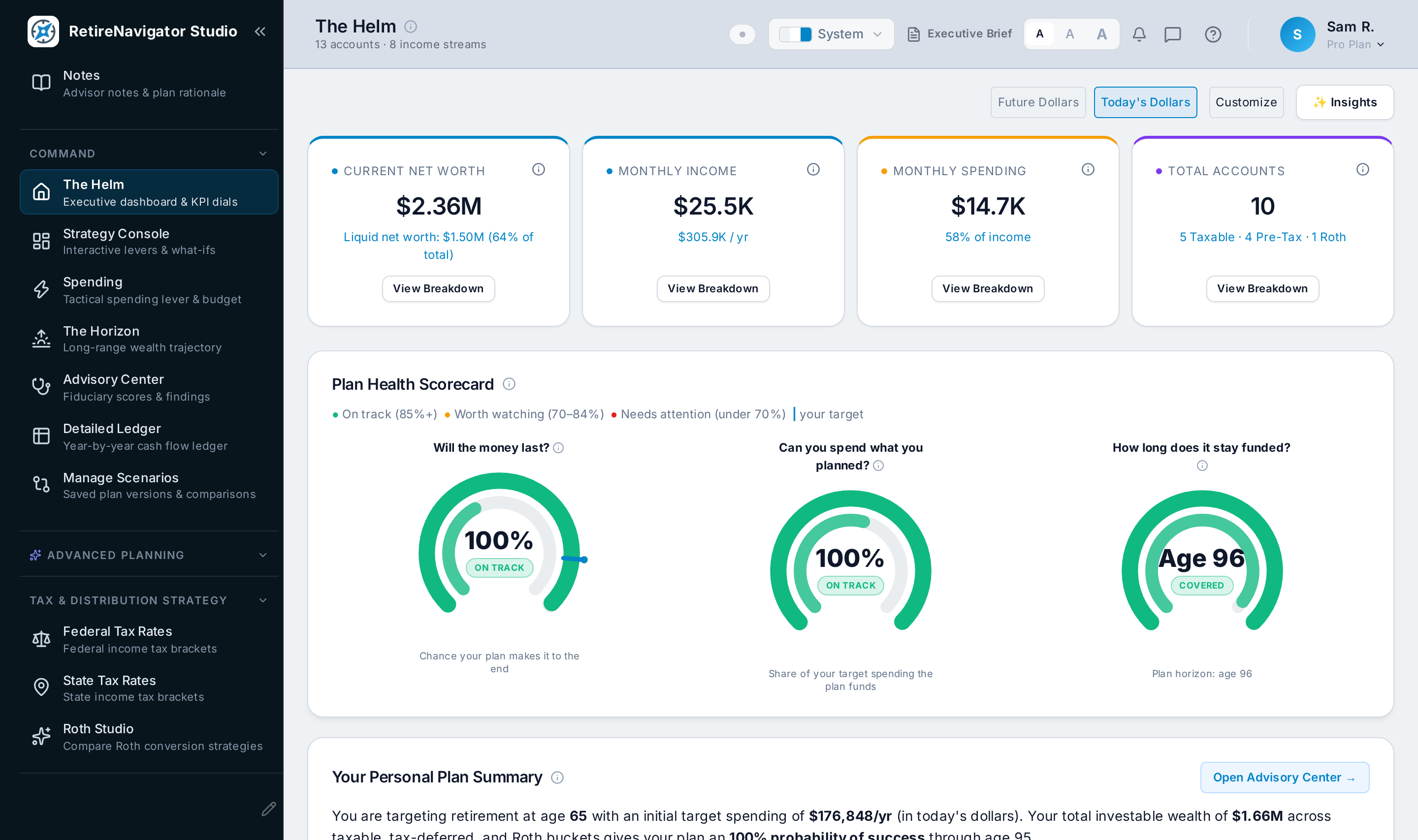
RetireNavigator Studio dashboard: net worth trajectory, plan health KPI dials, and survival probability curves

"Engineered against IRS Publication 590-B, IRC §86, and statutory Form 1040 worksheets, backed by 7,900+ automated regression tests."

Retirement isn't a spreadsheet problem — it's a human one. We start with the life you actually want, then let the numbers show you how to get there.

100% Private
Private, local-first architecture. Your financial plan lives entirely in your browser's private storage, with optional AES-GCM-256 passphrase encryption available at rest and on export.
Zero Bank Logins
No bank credentials, your plan stays on your device, and no analytics or tracking.
Up-to-Date Tax Laws
Accurate formulas for SECURE 2.0, RMD ages, and Social Security tax rules.

RetireNavigator Studio is an educational planning guide, not an investment advisor. It is designed to empower you with clear answers before sitting down with your CFP®, CPA, or tax professional.

Your Retirement Roadmap

A simple, guided path from your very first numbers to the spending dashboard you'll enjoy year after year.

1
Step 1: Getting Organized

Chart Your Course

Answer simple questions about your family, lifestyle, and goals without blank-page stress. Bring in your existing Quicken or financial files with one click—no bank passwords or account linking needed.

2
Step 2: Your Blueprint

Your Plan

View all your savings, pensions, and Social Security in one unified dashboard. Check how long your nest egg will last and catch upcoming tax bumps before they eat into your lifestyle.

3
Step 3: Live Command

The Helm

Your live command center for retirement planning. Check safe spending amounts anytime, coordinate smart Roth conversions, and navigate life changes with total clarity.

Move Forward With Peace of Mind.

Spending your savings is an emotional adjustment, not just math. RetireNavigator Studio gives you clear guardrails so you can enjoy your life without second-guessing your finances.

Give Yourself Permission to Spend

We model your active travel years, relaxed middle retirement, and quiet later years with flexible spending guardrails—giving you confidence to enjoy your money while you're most active.

Plain-English Guidance at Every Step

No confusing fine print. Contextual explainers walk you through spousal age differences, early retirement access, and Medicare surcharge tiers without complicated tax jargon.

Better, More Productive Advisor Meetings

Walk into your CFP® or CPA reviews fully prepared. Export clean, multi-page summaries so your professional team can spend time giving high-level strategic advice instead of manual data collection.

Two tiers. One local engine.

From a fast baseline solvency check to a comprehensive spending & tax suite — everything runs in the same offline runtime.

Essential Retirement Planning, Entirely on Your Device

Guided Onboarding & Intake Wizard

Simple, step-by-step setup for your household, income, accounts, and goals through manual entry—no financial degrees required.

Cash Flow & Net Worth Projections

Clearly track when paychecks end, when Social Security starts, and how your net worth is projected to grow, year by year.

Deterministic & Monte Carlo Engines

See how long your savings will last under steady growth as well as thousands of simulated market swings.

Goals & Milestones Tracker

Track your Needs, Wants, and College goals alongside your plan so every big expense is accounted for.

Private Local Storage & JSON Export

Private, local-first architecture. Your financial plan lives entirely in your browser's private storage, with optional AES-GCM-256 passphrase encryption available at rest and on export. JSON export for backups, never a third-party cloud.

Light, Dark, System & High-Contrast Themes

Easy on the eyes: choose light, dark, match your system, or switch to a high-contrast accessibility theme.

Comprehensive Spending, Tax & Legacy Strategies

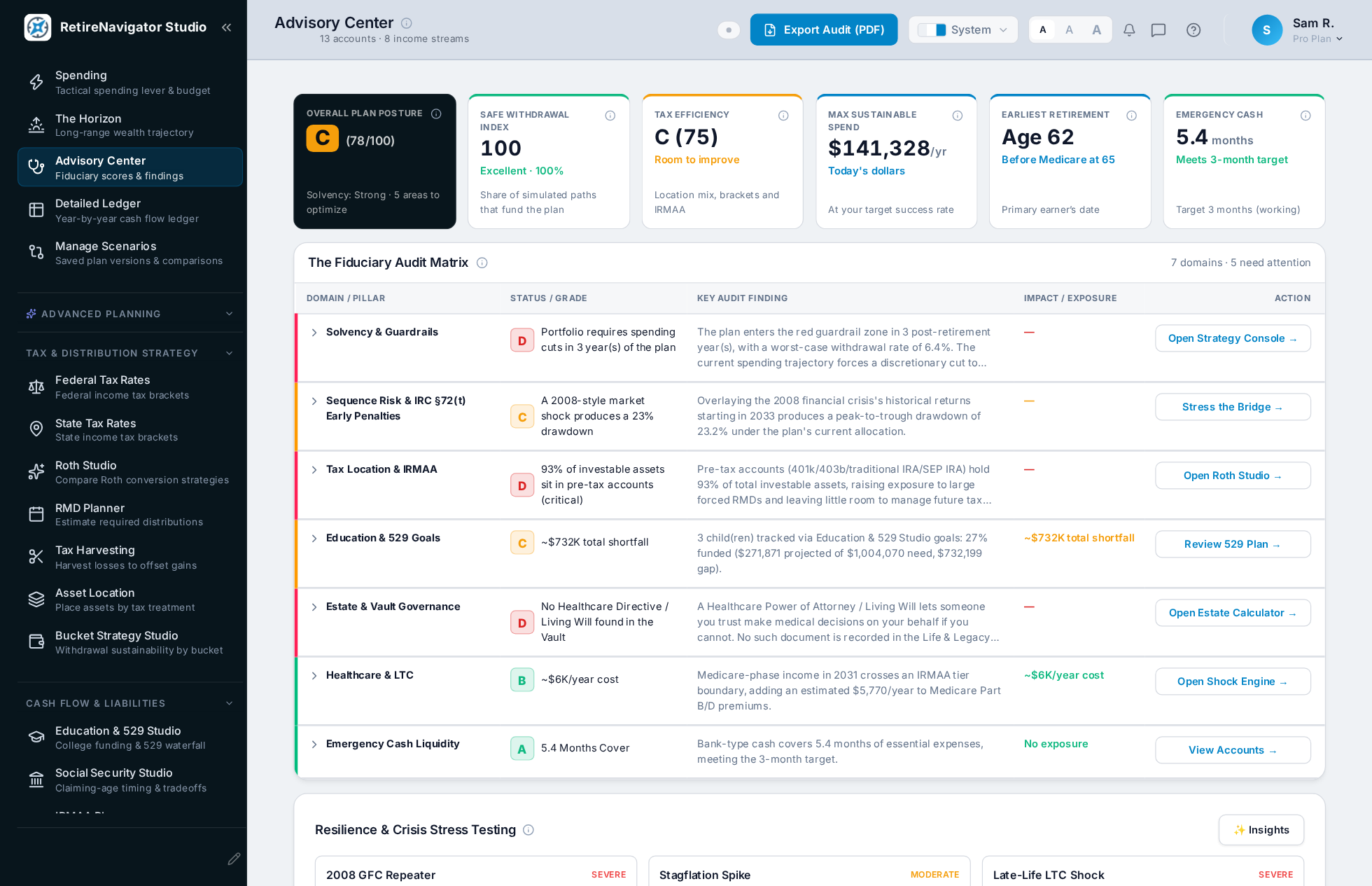
Advisory Center: plan posture scores, domain-by-domain findings, and an AI-driven honest-conversation review

Advisory Center

Diagnostic Scores & Findings — Plan resilience, safe withdrawal index, and tax efficiency scored at a glance, backed by a candid, AI-driven "Review Your Plan Together" read on where your plan actually stands.

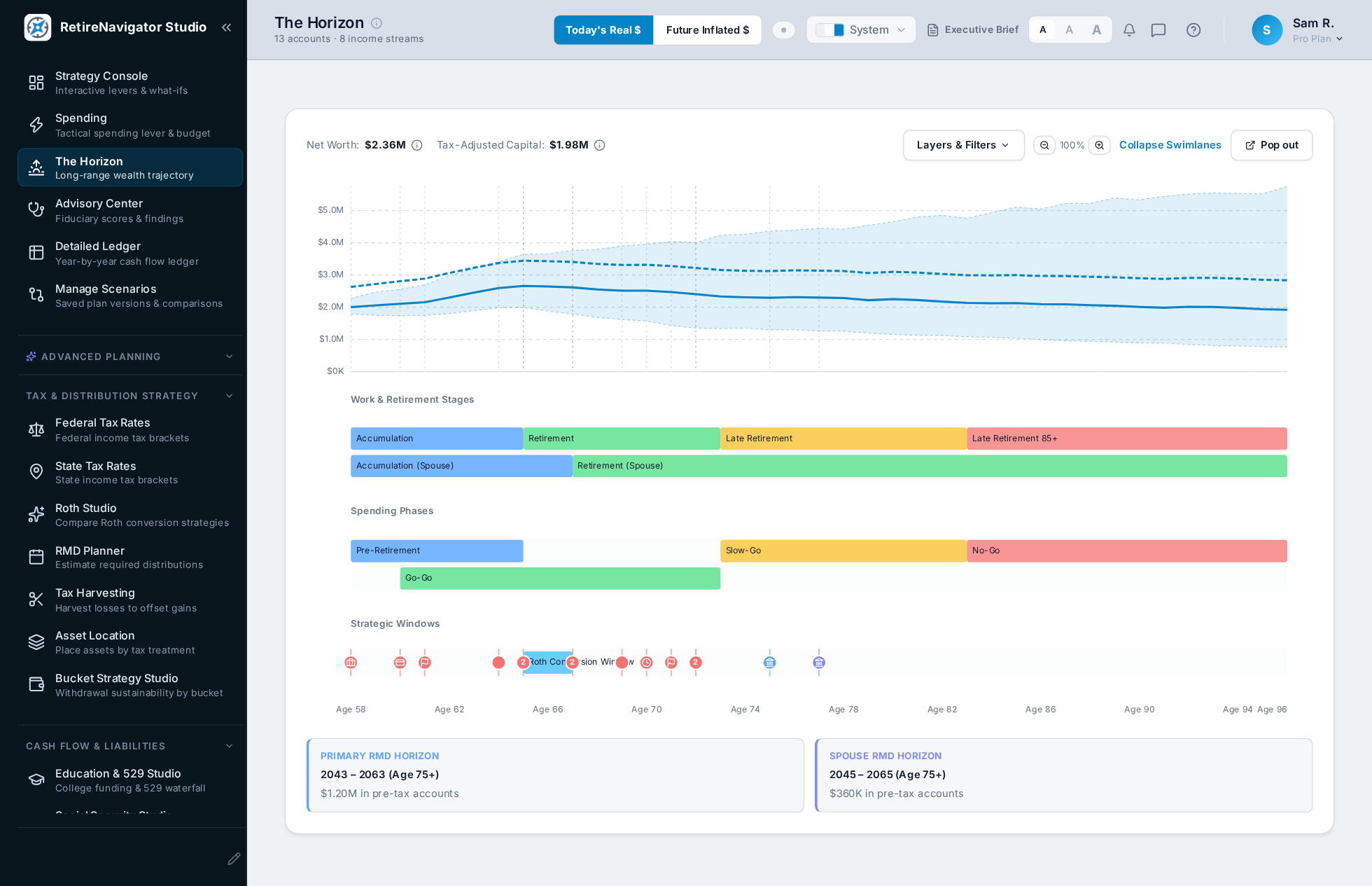
The Horizon: long-range wealth trajectory synchronized with career/retirement stages, spending phases, and strategic tax windows on one timeline

The Horizon

Long-Range Wealth Trajectory — Your whole plan on one timeline: net worth, work & retirement stages, spending phases, and RMD/Roth conversion windows, synced to a single shared crosshair.

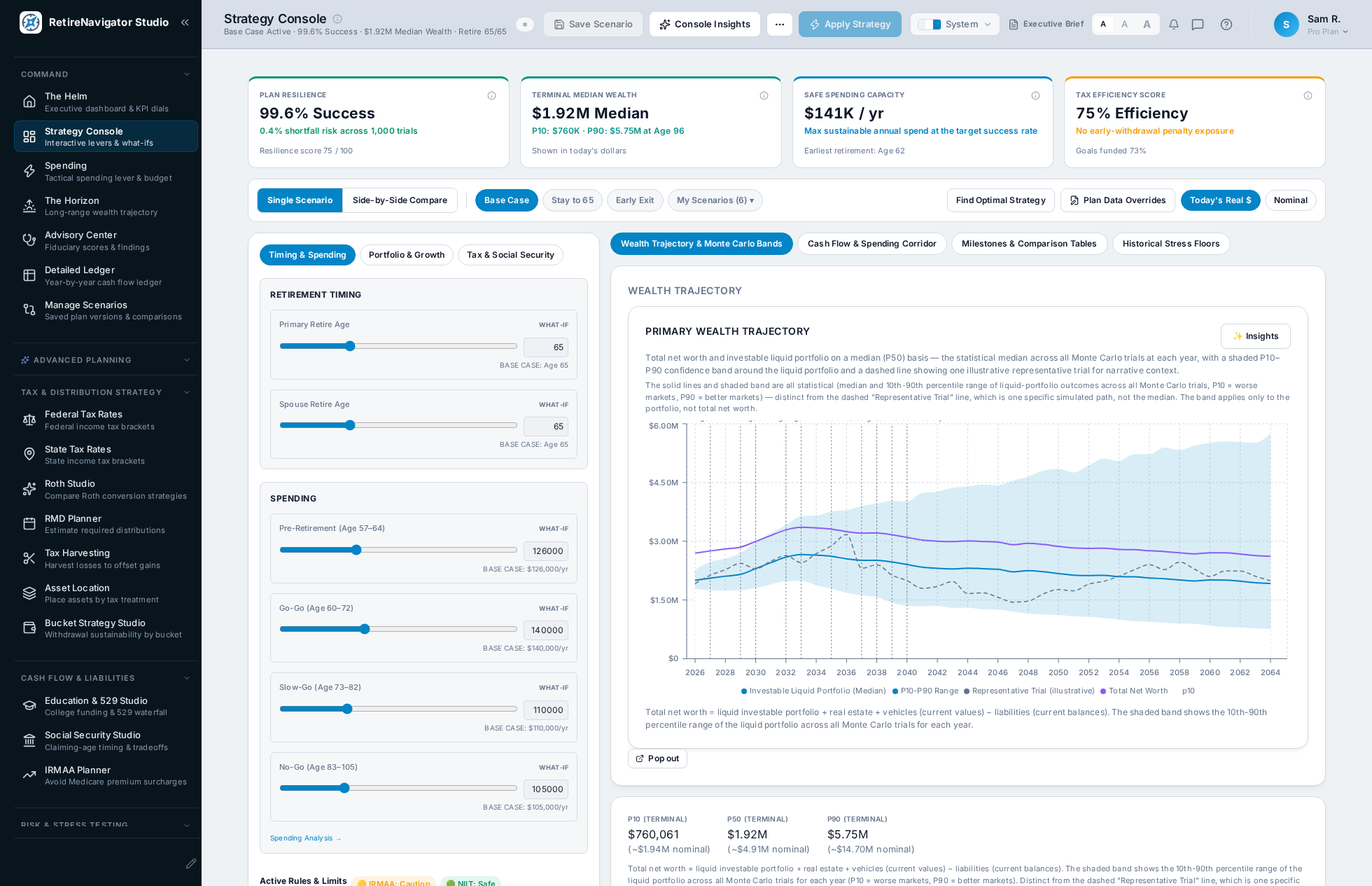
Primary Strategy Console: live Monte Carlo slider rail, KPI strip, and Apply Strategy sandbox workflow

Primary Strategy Console

Interactive "What-If" Sliders — Instantly see the impact of retiring two years earlier, adjusting your lifestyle budget, or delaying Social Security. Test any scenario safely without changing your saved plan.

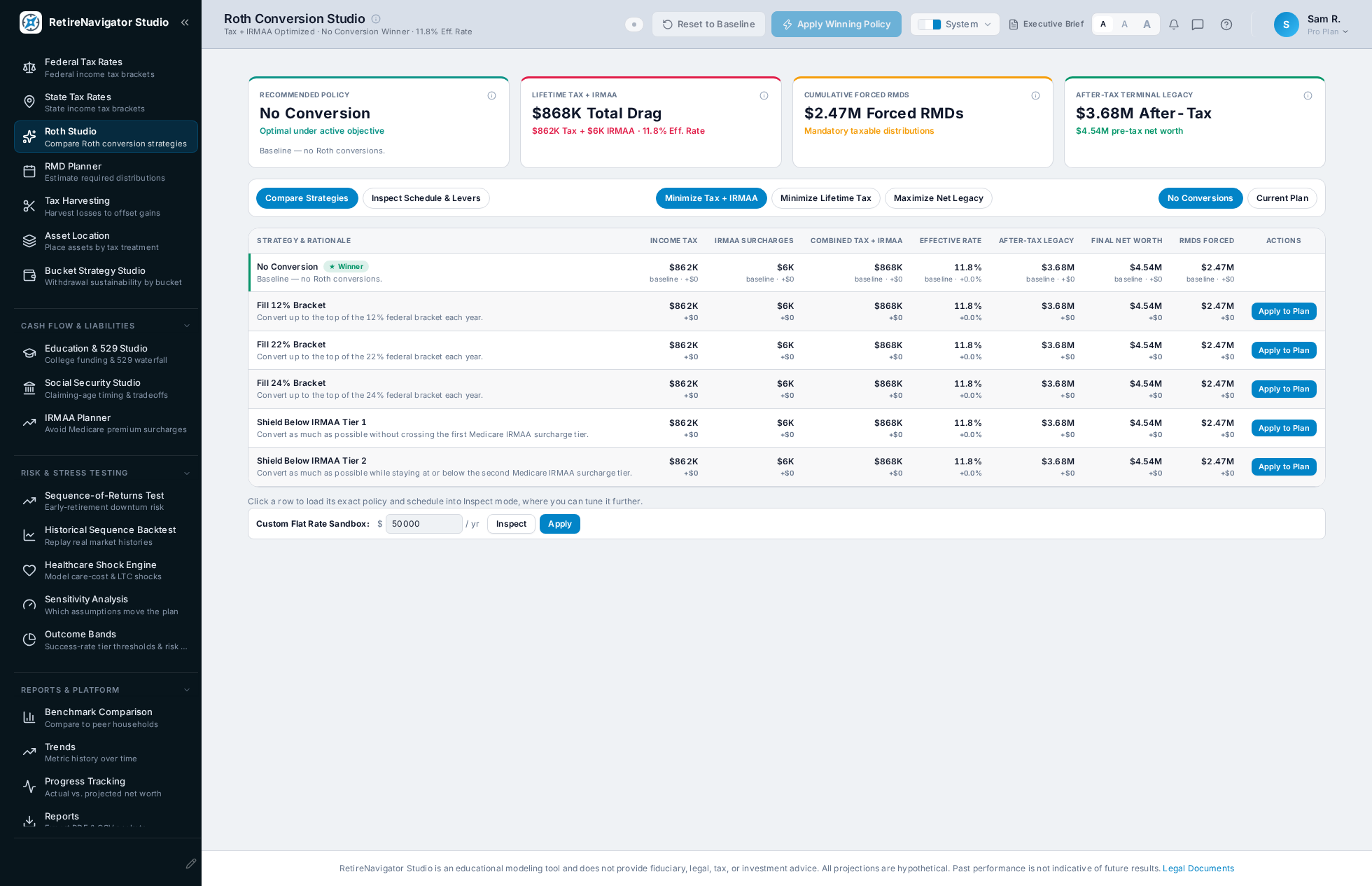
Roth Studio: multi-year bracket-filling matrix with IRMAA cliff avoidance

Roth Conversion Studio

Smart Roth Conversion Planner — Move pre-tax funds into tax-free Roth accounts at lower tax brackets, while automatically steering clear of expensive Medicare surcharges.

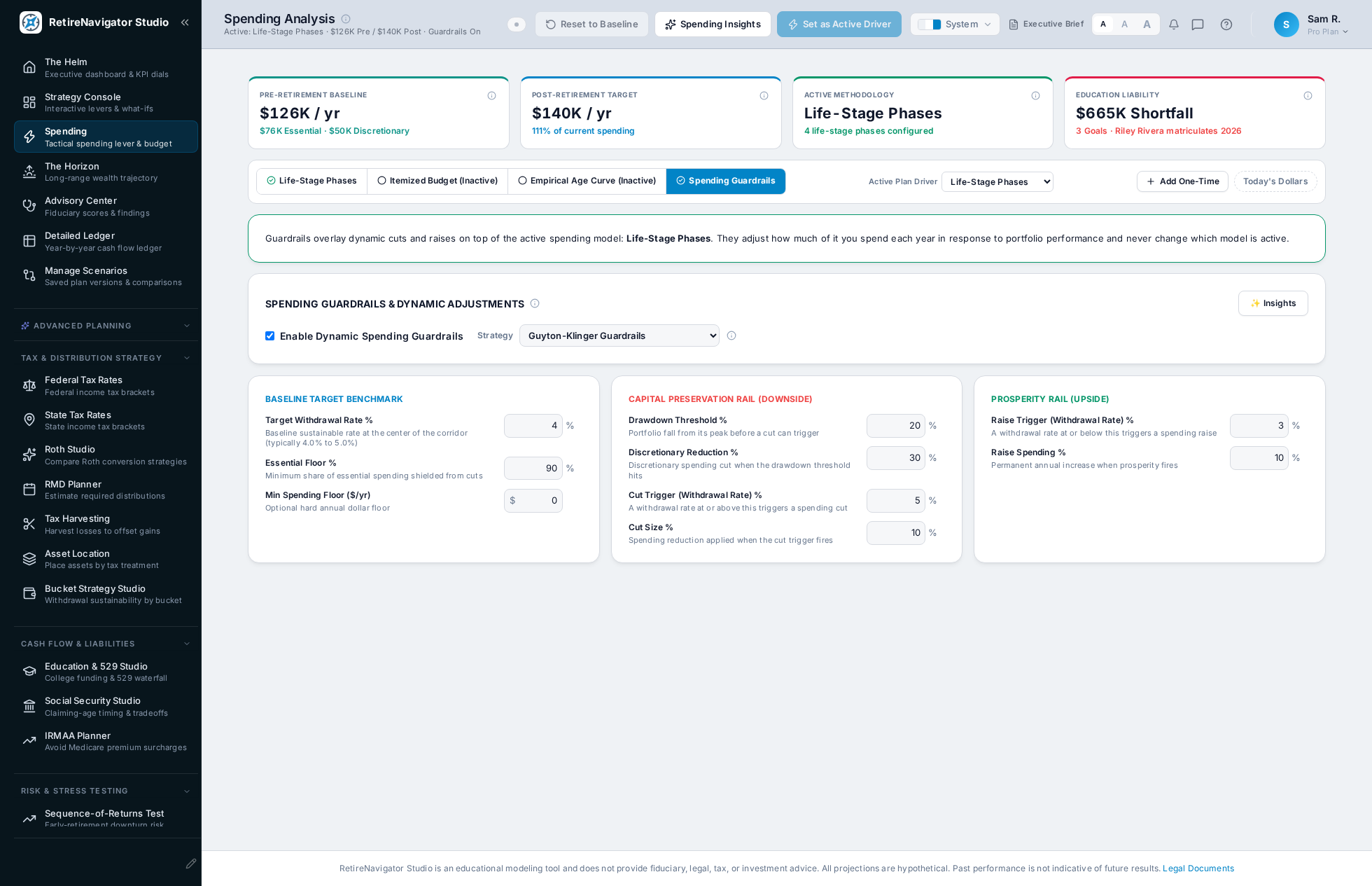
Dynamic spending guardrails: Guyton-Klinger capital preservation and prosperity rules

Dynamic Guardrails

Flexible Spending Guardrails — Know exactly when it's safe to give yourself a spending raise in good markets, and when to trim back slightly during market dips.

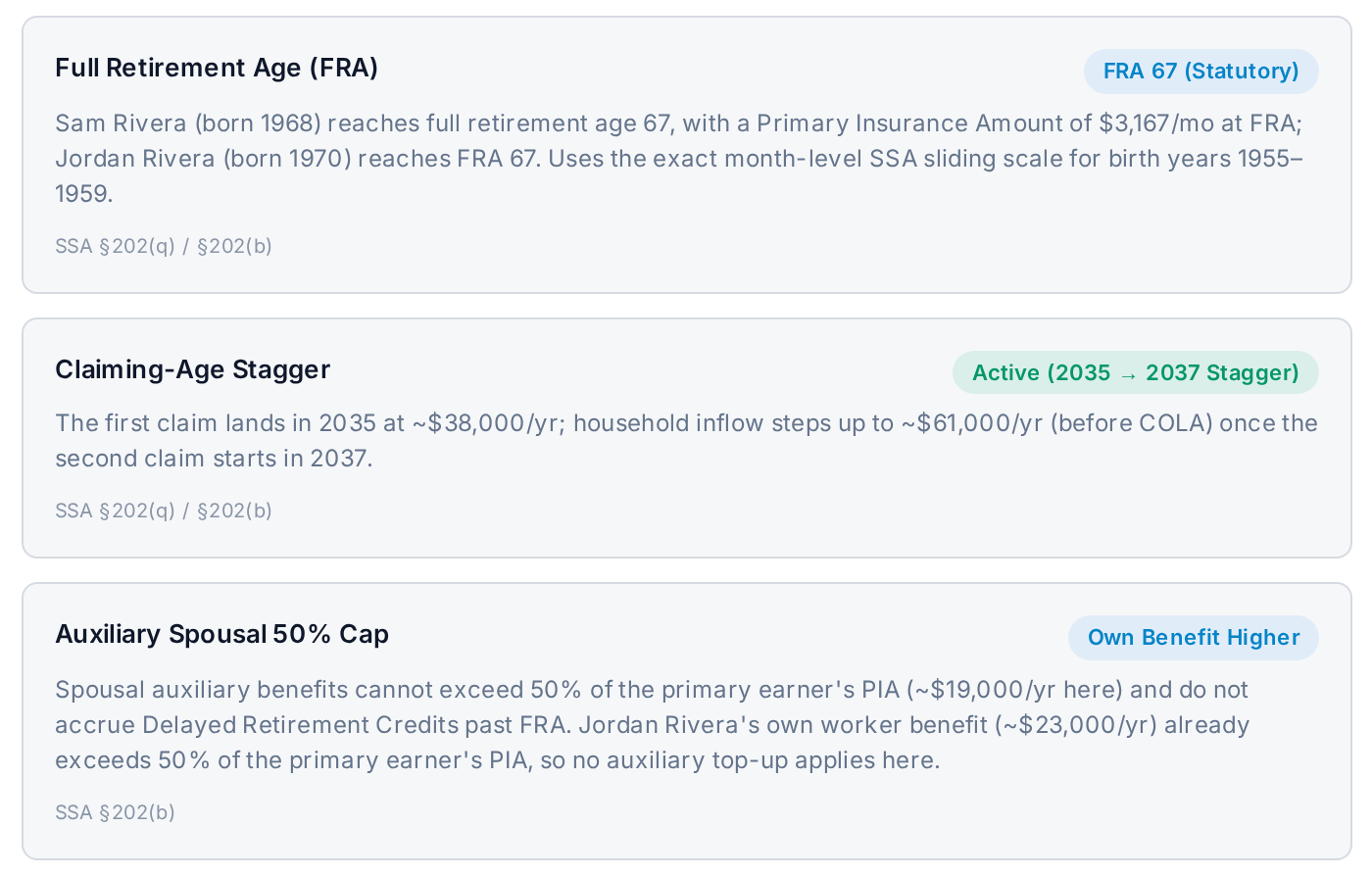
Active Rules & Limits: statutory IRS, Social Security, and tax-threshold rules governing the plan's calculations

Statutory Audit Engine

Complete Tax Transparency — Every withdrawal, tax withholding, and leftover dollar balances out mathematically against official IRS and state tax tables.

More of What's Inside

A closer look at the specialized studios and tools underneath the six command centers.

The Full Engine Room

The Strategy Console and Roth Studio are just the beginning — the same local engine runs 40 dedicated studios, optimizers, and diagnostics, organized into 6 command groups below.

1. Foundations & Manifest

Accounts & Holdings

Track 17 account types, each with its own tax treatment, plus holdings, securities, and categories—with stale-balance flags so nothing quietly goes out of date.

Income Streams

Model salary, pensions, rental, Social Security, and 20+ other income types, automatically sorted into guaranteed versus variable.

Goals & Milestones Studio

Automatically weaves specific life dreams—bucket-list travel, home updates, new cars, or wedding gifts—into your budget.

Real Estate & Vehicles

Properties and vehicles with carrying costs, mortgage service, and equity at a glance—including a ready template to model downsizing or a sale.

Liabilities & Debt Payoff

Track 16 kinds of debt and compare payoff orders—avalanche or snowball—to see what gets you debt-free soonest, before or during retirement.

Guaranteed Income & Annuities

Simulates adding predictable lifetime income to your plan to see how it reduces market risk.

Zero-Cloud File Import (QIF)

Easily load your balances directly from Quicken or financial files without handing over passwords. Included in Navigator Pro / Studio.

2. Command

The Helm

Your live cockpit: net worth, income, and spending at a glance, with plain-question health dials for whether the money will last.

Primary Strategy Console

Slide retirement age, spending, and claiming dates and watch live Monte Carlo results, backed by the Strategy Console's verified statutory rule engine and inline parameter controls. Test big decisions safely in the What-If sandbox before committing to your baseline plan.

Automated Strategy Finder

Automatically checks hundreds of claiming ages and withdrawal combinations to highlight your most tax-efficient options.

Spending Analysis & Dynamic Guardrails

Models three baseline spending drivers—Itemized Budget, Phased Life-Stages, and an Empirical Age Curve—paired with a Guyton-Klinger capital-preservation overlay that tells you when to trim and when you can safely raise spending.

The Horizon

A single panoramic roadmap aligning your career exit, spending phases, milestones, and strategic tax windows with your lifetime wealth trajectory.

Advisory Center

Evaluates seven diagnostic domains: Solvency & Guardrails, Sequence Risk & §72(t), Tax Location & IRMAA, Education & 529, Estate Planning, Healthcare & LTC, and Emergency Cash.

Detailed Ledger

A year-by-year cash-flow ledger where any figure can be clicked to see exactly what is summed into it, with the statutory rules cited.

Manage Scenarios

Save named what-if scenarios and compare them side by side against your Base Case to see the exact trade-offs between retirement paths.

3. Tax & Distribution Strategy

Roth Conversion Studio

Multi-year roadmap to convert retirement balances into tax-free growth without tripping higher tax brackets.

Tax Strategy Comparison

Compares four distinct withdrawal strategies side-by-side to show lifetime tax savings and final legacy amounts.

RMD Planner

Previews your required minimum distributions under current SECURE 2.0 laws to avoid surprise tax jumps at age 73 or 75.

Tax-Loss Harvesting Guide

Tracks opportunities to offset realized capital gains with investment losses.

Asset Location Optimizer

Shows which investments belong in your IRA vs. Roth or brokerage accounts to minimize annual tax drag.

Bucket Strategy Studio

Organizes your wealth into short-term cash, intermediate income, and long-term growth buckets for steady spending.

Smart Withdrawal Sequencing

Coordinates which accounts to draw from first (taxable, pre-tax, or Roth) to keep lifetime taxes as low as possible.

Early Retirement Bridge (Pre-59½)

Shows how to access funds penalty-free before age 59½ using the Rule of 55, 72(t) schedules, and Roth contributions.

Federal & State Tax Engines

Applies federal, state, and payroll rules to every dollar withdrawn, engineered against IRS Publication 590-B, IRC §86, and statutory Form 1040 worksheets, with editable rate tables for what-if scenarios.

Hidden Tax Cliff Visualizer

Spots hidden tax jumps—including Medicare surcharges and the 3.8% Net Investment Income Tax.

Surviving Spouse Tax Jump

Protects the surviving spouse by planning ahead for the sudden jump into higher single-filer tax brackets.

4. Cash Flow & Liabilities

Education & 529 Waterfall

Maps out education funding timelines and shows whether your college savings are on track.

Social Security Studio

A 9×9 spousal claiming grid judged through three lenses—Lifetime Benefit, Portfolio Longevity, and the Survivor Floor—plus a benefit-reduction stress test that models a 21% trust-fund cut.

IRMAA Avoidance Planner

Highlights Medicare Part B and Part D surcharge tiers so an extra dollar of income doesn't trigger higher healthcare premiums.

5. Risk & Stress Testing

Sequence-of-Returns Test

Stress-tests your nest egg against the 2008 Great Recession, the 2000 Dot-Com crash, 1970s inflation, and other major downturns.

Historical Sequence Backtest

Tests your exact plan against every market cycle since 1926—proving how it would hold up through real history.

Healthcare & LTC Shock Engine

Models pre-65 health insurance costs alongside potential long-term care needs late in life.

Sensitivity Analysis

Shows which single factor—market returns, inflation, spending habits, or longevity—has the biggest impact on your future.

Outcome Bands

Define what “Excellent” to “Non-Viable” means for you—success-rate tiers you can rename and recolor, used everywhere your plan's odds are shown.

6. Reports & Platform

Benchmark Comparison

See how your savings, net worth, and asset mix compare to real-world Federal Reserve and Census data.

23-Section Advisor Dossier

Generates a comprehensive, professional summary packet ready to review with your CPA, CFP®, or attorney.

Trends & Analytics

Time-filterable views of net worth versus liabilities, net worth by account type, top payees, and top spending categories from your own register.

Net Worth Progress Tracker

Track your real-world balances over time directly against your original roadmap.

Calculators & Quick Math

17 standalone what-if tools—rent vs. buy, loans, time value of money, estate tax & portability, and more—for quick answers away from the full plan.

Plain-English Explanations

Contextual explainers that detail the exact reason behind any tax change, RMD rule, or calculation.

Why Offline Matters

Your life savings aren't marketing data. They belong on your computer.

Traditional Spreadsheets & Cloud Tools

Cloud apps and DIY workbooks work well for basic budgeting—but they weren’t built for private, lifelong retirement planning.

  • Spreadsheets are powerful but fragile: a single broken formula can quietly skew a plan you’ve trusted for years.
  • Mandatory bank logins: financial aggregators route your private credentials through third-party servers.
  • Recurring subscriptions: monthly fees that lock your plan behind a paywall if you pause your membership.
  • Simplified tax rules: online calculators often use blended averages, missing local brackets, RMD timing, and Medicare cliffs.

RetireNavigator Studio

Built specifically for planners who want institutional-grade depth with complete personal privacy.

  • Private and local by default: every calculation runs on your machine, and the offline build never sends your plan anywhere. The few features that touch a server are one-time or opt-in: license activation, feedback you choose to send, and the online build’s sync and AI Insights.
  • Zero credential sharing: no linking bank accounts, no cloud logins, and no third-party data brokers.
  • Perpetual ownership: your plan is saved and encrypted on your own disk—accessible whenever you need it.
  • Transparent math you and your advisor can review and trust.

Total peace of mind: Your life’s work stays in your hands—not in a marketing database.

One-time purchase. Own it for life.

No recurring subscriptions required to keep using the software you own.

Navigator Essentials

Free Forever Tier

$0

Free / No Account Needed

  • Full guided onboarding & intake wizard (manual entry)
  • Baseline cash flow & net worth trajectory projections
  • Deterministic & core Monte Carlo simulation engines
  • Goals & Milestones tracker (Needs, Wants, and College goals)
  • Private local storage & JSON export (optional passphrase encryption)
  • Light, Dark, System & High-Contrast accessibility themes
Start Free with My Plan
Founding Beta Member Special

Navigator Pro / Studio

$149 $249 Save $100

One-Time Payment · Perpetual Lifetime License · Limited-Time Founding Beta Rate

Includes 1 full year of statutory updates & new features · Optional $49/yr thereafter

  • Everything in Essentials, plus:
  • Primary Strategy Console & Grid-Search Optimizer
  • Full Roth Conversion Studio & Bracket-Fill Ladders
  • Medicare IRMAA 2-Year Lookback & RMD Planners
  • Dynamic Guyton-Klinger Spending Guardrails
  • Historical Crisis Stress Suite (2008 GFC, 1929 Crash, Stagflation)
  • The Horizon Life & Wealth Visualizer (synchronized timeline crosshairs)
  • Client-side AES-256 Encrypted Life & Legacy Vault
  • 23-Section Executive Advisory Brief & PDF Report Export
  • Peer Comparison Benchmarks (SCF, Census, BLS, Vanguard)
  • Transaction & holdings import (QIF, OFX, Fidelity CSV) with institution matching
  • Bring-your-own AI: plain-English Insights & “Review Your Plan Together” through your own LLM (your key, your provider URL)
  • QR plan transfer between devices & a fully customizable Helm dashboard
  • Full tax, statutory audit & estate planning suite — see the complete list ↓

Founding Beta licenses are final sale. Fully test the platform, ledger, and Monte Carlo engine in Navigator Essentials (100% free forever, no account required) before purchasing Pro.

Get Navigator Pro / Studio

Every Navigator Pro license includes perpetual lifetime ownership of the application, plus 1 full year of continuous feature releases and statutory tax updates (federal IRS and Social Security figures, shipped within 30 days of the IRS announcing them; state tables are updated when practical).

To keep receiving ongoing studio enhancements and up-to-date statutory rules in future years, an optional Feature & Statutory Pass is available for $49/year. This pass is entirely optional—your software never expires, locks, or stops functioning.

RetireNavigator Studio is an educational modeling tool, not a registered investment advisor. It does not provide personalized legal, tax, or investment advice. Projections are hypothetical and based on your inputs. Review your plan with a qualified CFP®, CPA, or estate attorney before making financial decisions.

Frequently asked questions

Zero cloud tracking or bank scraping. Financial calculations run 100% locally on your machine. External network access is limited strictly to optional Pro seat activation, user-configured BYOK AI Insights, and opt-in updates. Private, local-first architecture. Your financial plan lives entirely in your browser's private storage, with optional AES-GCM-256 passphrase encryption available at rest and on export.

Spreadsheets are flexible but fragile—one misplaced formula can derail your planning. Free online calculators give quick estimates, but usually gloss over state taxes, Medicare cliffs, and Roth conversion limits. RetireNavigator Studio gives you modern, interactive visuals backed by verified tax math, without needing bank logins or complex formulas.

Your first year of statutory tax updates and new features is included. To keep receiving them in future years, an optional Feature & Statutory Pass is available for $49/year to import new IRS brackets and Social Security rules (state tables are updated when practical). It's completely optional—your software never expires, locks, or stops functioning.

Yes. As a PWA with a local cache (and as a desktop app), RetireNavigator Studio operates 100% air-gapped once loaded — plane mode, cabin in the woods, or a machine that never connects to the internet all work fine.

No—it's built to make your advisor meetings far more productive. RetireNavigator Studio is an educational decision guide to help you ask the right questions and explore possibilities. The 23-Section Advisor Dossier lets you bring clear, organized options to your CFP®, CPA, or tax advisor so they can focus on high-value advice rather than data entry.

Ready to plan your retirement spending with confidence?

No sign-up, no bank logins, no data leaving your machine — just a clear, private plan you can trust.